



Members can log in or sign up to access detailed information about their account.
Click here to get all the TRS Forms.
Find seminars and interactive webinar information here.
See our Objectives, Portfolio, Reports & Resources, and Performance.




MyTRS puts your retirement information at your fingertips. Our secure online portal lets members easily access account details, track benefits, and manage key tasks anytime. Whether you’re an active educator planning ahead or already enjoying retirement, MyTRS offers convenient tools like member statements, benefit estimates, and personalized retirement planning resources—all in one place.
Watch the MyTRS help video to learn more!
Can I get an estimate of benefits with all plan options on MyTRS?
Yes. Members can create retirement benefit estimate through MyTRS. Alternatively, members may submit a Pre-Retirement Information Verification (PIV no later than ninety (90) days before your requested retirement date and no earlier than twenty-four (24) months before your earliest retirement eligibility. The easiest and quickest way to submit the PIV is through MyTRS, although you can mail a PIV to TRS. Your requested retirement projection or Application to Retire will be mailed to you.
How do I find information about retiring?
You should create a retirement benefit estimate in MyTRS at least one year before your expected retirement date. You must submita Pre-Retirement Information Verification (PIV) to TRS no later than ninety (90) days before your requested retirement date. You may submit a PIV no earlier than twenty-four (24) months before your earliest retirement eligibility. The easiest and quickest way to submit the PIV is through MyTRS, although you can mail a PIV to TRS.
You should also consider attending one of our in-person or virtual retirement planning seminars. More information, including retirement timelines, the retirement process, presentation, seminar and webinar dates with registration, and more can be found on the Retirement Seminars page.
If I want to retire this year, what do I need to do?
Generally, you should start the process approximately 6 months before the projected retirement date to ensure your account is free of outstanding balances or issues that need to be resolved. Please refer to the retirement timelines chart to determine when you should begin your retirement process. Retirement is accomplished through the following three-step process.
Step One:
If you are planning to retire, TRS must receive a completed Pre-Retirement Information Verification (PIV) no later than ninety (90) days before your requested retirement date and no earlier than twenty-four (24) months before your earliest retirement eligibility. The easiest and quickest way to submit the PIV is through MyTRS, although you can mail a PIV to TRS. If the PIV is received less than 90 days prior to the projected retirement date, the retirement date will be delayed by at least one month. All pending balances owed must also be paid at least 90 days prior to the projected retirement date to ensure all available service credit is included in the benefit amount.
Step Two:
Upon receipt of the PIV, your Application To Retire (ATR) will be mailed to you and must be completed and received back by TRS at least 60 days prior to retirement. If the ATR is received less than 60 days prior to the projected retirement date, the retirement date will be delayed by at least one month.
Step Three:
Upon receipt of the ATR by TRS, a Final Contract for Retirement will be mailed to you. Your completed Final Contract and required documents for retirement must be received by TRS no less than 30 days before your effective retirement date. If the Final Contract is received less than 30 days prior to the effective retirement date, the retirement date will be delayed by at least one month. You are responsible for correctly completing all necessary paperwork in a timely manner and ensuring TRS has received it.
The effective retirement date must begin on the first of the month. The first retirement benefit payment will be made on the first of the month following the effective retirement date. For example, for a June 1 retirement date, the Final Contract for Retirement must be received by TRS by May 1 in order to process the first retirement benefit payment on July 1.
When can a TRS member retire?
A vested member of TRS is eligible to apply for retirement benefits:
Ways to make an appointment to discuss my retirement benefits?
You may contact TRS by phone, e-mail, or secure messaging through MyTRS to schedule an appointment after you receive a hypothetical estimate, projection or Application to Retire. Members may submit a Pre-Retirement Information Verification (PIV) to TRS, or through MyTRS, no later than ninety (90) days before your requested retirement date and no earlier than twenty-four (24) months before your earliest retirement eligibility TRS responds to inquiries in a timely manner, providing estimates of retirement benefits under all options for the date(s) requested.
Do I get a refund if I terminate my membership with TRS?
A member may request to withdraw their accumulated member contributions credited to their account after they have terminated all employment in Oklahoma public education. Employment in Oklahoma public education includes positions that are otherwise ineligible for TRS membership. A member may request a withdrawal packet by secure messaging through MyTRS or by phone at (405) 521-2387. Payment can be issued as early as 4 months after the termination date. The member’s termination date is verified by their former employer(s). For more information on withdrawing your account, please refer to the Member Handbook.
What is a 1099-R?
IRS Form 1099-R is an annual statement of disbursements and applicable taxes withheld by a retirement plan. Each year, the Teachers' Retirement System of Oklahoma (TRS) sends a 1099-R to any person who has received payments from TRS in the previous calendar year, including but not limited to: retired members or joint annuitants who received retirement benefits, members who took a distribution of their employee contributions after they left employment with a participating employer, and beneficiaries of active or retired members who received some form of survivor benefit.
When are 1099-R forms mailed? (OR) When will I receive my 1099-R?
Forms will be mailed no later than January 31st of the current year. Please allow for normal delivery time. If you have not received your Form 1099-R by February 15th, please see “How do I get a duplicate copy of my 1099-R?” below.
Are 1099-Rs available in MyTRS?
Yes. Form 1099-Rs will be accessible in MyTRS no later than February 1st. If you have not registered for access to MyTRS, please complete registration at this link. You can also elect to receive your Form 1099-R electronically each year. This election is available in MyTRS, and once the election has been made, you’ll receive an email notification each year as soon as the forms are made available.
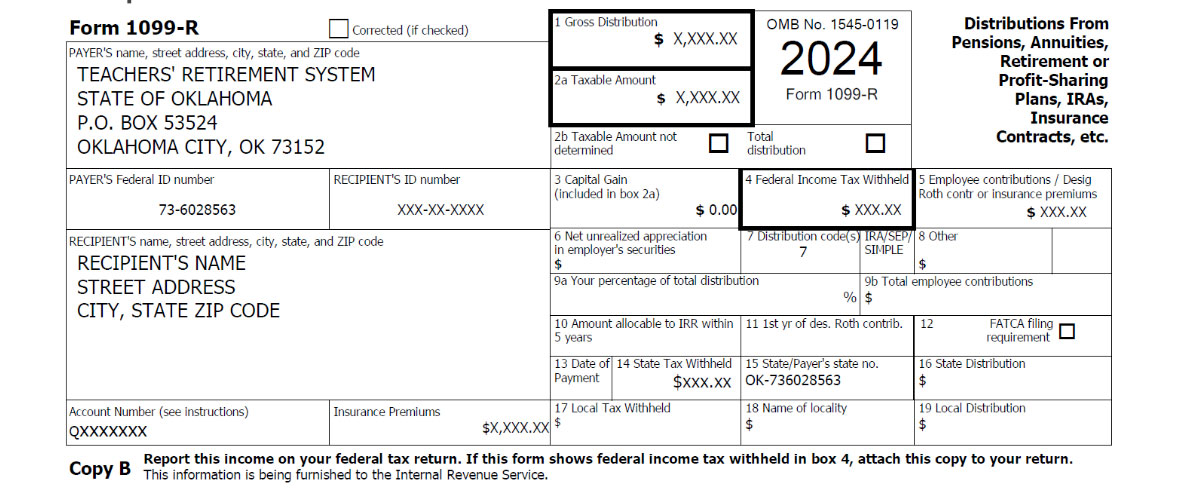
Why is the taxable amount (Box 2a) less than the gross distribution (Box 1)?
There were after-tax dollars in the retirement account. This occurs if after-tax retirement contributions were made while employed or after-tax money was used as payment for a service purchase, redeposit or other billing, etc. This reduces the taxable portion of the total amount, thus accounting for the difference in the two amounts.
Where do I find the amount withheld for federal and state taxes?
The amount of federal income tax withheld is located in Box 4, and the state tax withheld is found in Box 14.
Why was there little or no taxes withheld?
The amounts of federal and state income taxes withheld are based on the instructions you provided to TRS. If you instructed TRS to use the IRS and Oklahoma tax withholding tables to calculate your withholdings, and your benefit is less than the minimum amount required to have taxes withheld (based on filing status, exemptions and subtractions), then little or no taxes were withheld during the year.
*** TRS does not provide tax advice regarding the amounts to be withheld ***
Your withholding elections can be changed at any time in MyTRS or by mailing IRS Form W-4P and Form OK-W-4-P.
Forms can be returned by mail to:
Teachers' Retirement System of Oklahoma
P.O. Box 53524
Oklahoma City, OK 73152-3524
Why does the amount in Box 1 (Gross distribution) not match the total deposited into my account?
The amount deposited into your account is a net amount after subtracting things withheld from your benefit payments like taxes, insurance, levies, garnishments, member dues, etc.
What do the different boxes on the 1099-R represent?
What is the State ID number for TRS?
Please see Box 15 on Form 1099R. The “PAYER” on the 1099-R form is the Teachers’ Retirement System of Oklahoma (TRS) since TRS “pays” the benefit to the “recipient”. A PAYER must have a federal ID number on the 1099-R. Some people refer to it as a “State ID Number” but this federal ID number is only used for federal tax purposes and other limited purposes. So, the “State ID number” for 1099-R purposes is really the TRS Federal ID Number. The TRS Federal ID Number is 73-6028563.
Why did I receive multiple 1099-Rs from TRS?
Please do not discard any tax form you receive as you may have received a payment, other than a normal retirement, that required a different distribution code. Some of the reasons why you may have been issued two or more 1099-R forms are:
You should be able to determine from the amounts, or by the distribution code listed in box 7, which 1099-R is for which distribution. If you still have questions, contact TRS.
How do I determine how much was withheld from my retirement for medical insurance premiums?
If you had medical insurance premiums withheld from your TRS benefits, that amount will be clearly marked in the “Insurance Premiums” box on your 1099-R.
How do I get a duplicate copy of my 1099-R? (OR) How do I get a copy of my 1099-R if I did not receive it?
Duplicate Forms 1099-R are available in MyTRS.
In addition, you may request a duplicate Form 1099-R in writing, via fax or United States Postal Service. Your current mailing address must match our records before a 1099-R will be mailed to you. All requests must include your name, Social Security number, tax year requested, mailing address, daytime telephone number, and signature. Please allow 10-15 business days to receive your 1099-R.
Fax: (405) 522-2521
Mail: Teachers' Retirement System of Oklahoma
P.O. Box 53524
Oklahoma City, OK 73152-3524
Has your address changed? Addresses may be updated in MyTRS or you may complete and submit an updated Personal Data Form.
The IRS’ 1099-R website may be referenced as well:
http://www.irs.gov/pub/irs-pdf/f1099r.pdf
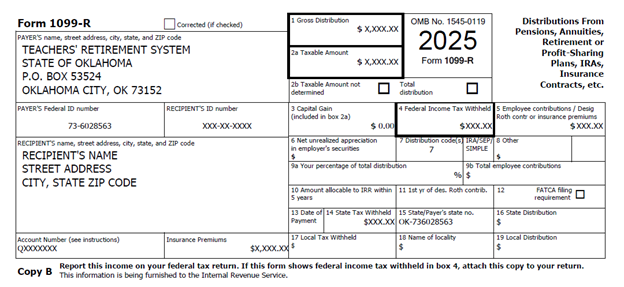
Box 1: Shows the total amount you received this year.
Box 2a: This part of the distribution is generally taxable.
Box 4: Shows federal income tax withheld.
Box 5: Generally, this shows the employee’s investment in the contract (after-tax contributions).
(Employee’s after tax contributions – made while you were employed. i.e. (if you made after-tax retirement contributions, used after-tax money as payment for a service purchase, redeposit or other billing, etc.)
Box 7. The following codes identify the distribution you received*:
1 — Early distribution, no known exception (in most cases a withdrawal, under age 59½).
2 — Early distribution, exception applies (under age 59½).
3 — Disability.
4 — Death.
4G — Death, Direct Rollover
7 — Normal distribution.
G — Direct Rollover
*For more details on distribution codes, please refer to the back side of your 1099-R form copy.
Box 14: State Income Tax Withheld
Insurance Premiums: Insurance premiums withheld from retirement benefit checks for the calendar year.
May I return to work after I retire with TRS?
The IRS requires a bona fide separation from service from all TRS-covered employers before a member can retire. This means that before you retire, you cannot plan either verbally or in writing to return to work with a TRS-covered employer after you retire.
Additionally, TRS retirees cannot work at any TRS employer in any capacity for a 60-day period following either (1) their effective retirement date, OR (2) their last day of preretirement employment, whichever is later. Failing to observe the 60-day break will result in a forfeiture of all retirement benefits received during this period.
After the 60-day break, TRS retirees have two options when returning to work for a TRS-covered employer: (1) Non-Contributory Status or (2) Contributory Status.
Non-Contributory Status: Retirees continue to receive their monthly retirement benefit but are subject to earnings limitations for the first 36 months following their retirement. Retirees do not receive any additional service credit towards retirement benefits.
Contributory Status: Retirees suspend their monthly benefit until employment is terminated and are not subject to any earnings limitations. These retirees contribute to TRS on the same terms as active members and earn additional service credit that may be used to accrue a secondary retirement benefit. For more information, please see our brochure on Returning to Work After Retirement as well as our Member Handbook.