
EBT Self-Service

The ConnectEBT App is the only official Oklahoma Human Services mobile app for EBT. Other EBT apps are NOT associated with Oklahoma Human Services and may not be safe. The secure ConnectEBT App connects directly to your official account. It is green and white and does not have ads.

For your safety and privacy, we recommend using only the ConnectEBT app, approved by the State of Oklahoma and built to protect your personal information. It’s an easy way to keep track of your benefits and stay informed anytime, anywhere.

Here are a few things you can do with the ConnectEBT App:

  • Create ConnectEBT login credentials
  • View transaction history
  • Order a replacement card
  • View current and future balances
  • Lock or unlock your card to protect your funds
  • Change your card PIN frequently

To update or change an address on your account, or to find out why funds were not received, please call (405) 522-5050.

Creating An Account

You must create an account to use ConnectEBT.

If you have used your EBT card to create and register a Propel account to access benefits, you will use that same login information.

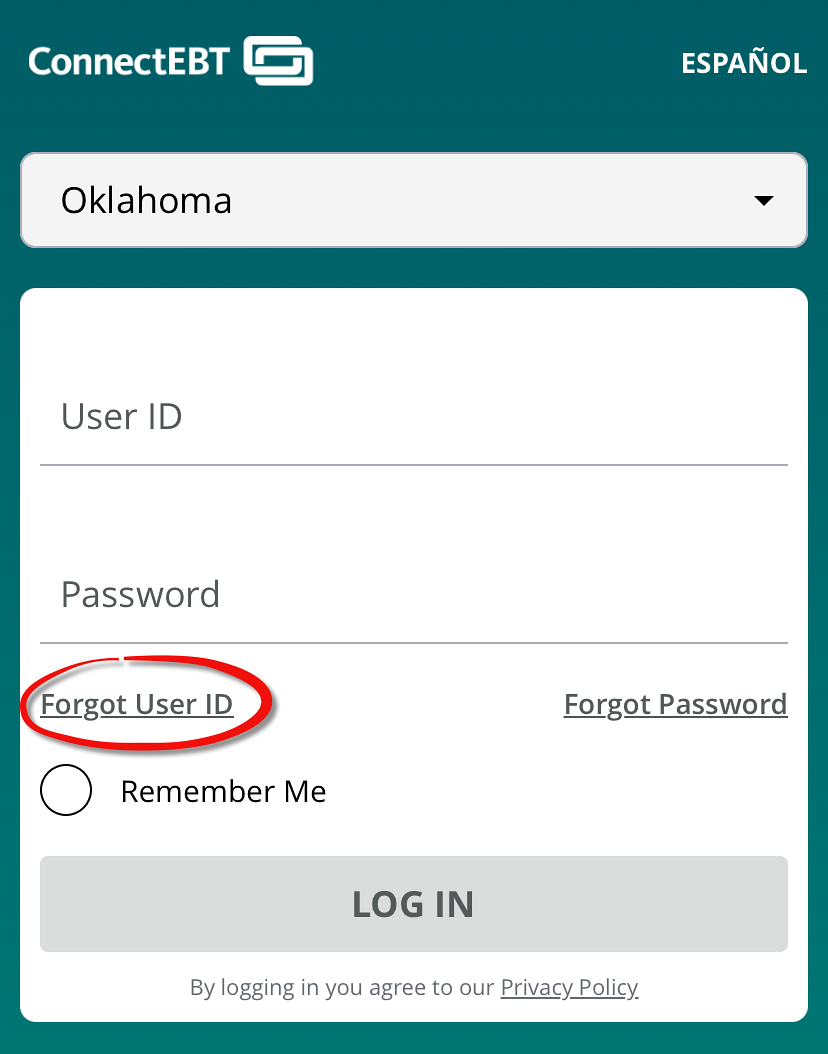
You can only register your card once. If you have forgotten your User ID, click Forgot User ID and it will be emailed.

Register

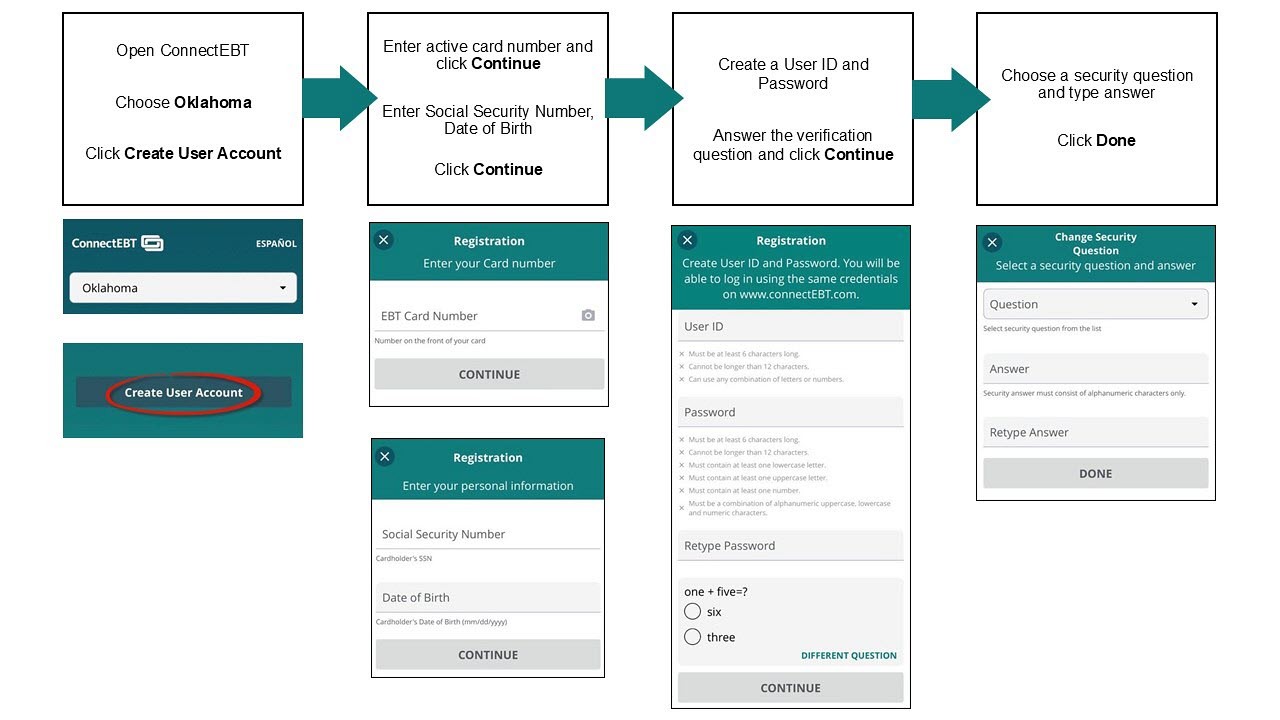
Open the ConnectEBT App. Choose Oklahoma. Click Create User Account. Enter active card number and click continue. Enter your Social Security Number and date of birth, then click continue. Create a user id and password, answer the security question and click continue. Choose a security question and type in answer. Click done.

Notes:

  • The cardholder’s date of birth and Social Security Number must match OKDHS records.
  • User ID cannot be an email address and cannot be changed or deleted.

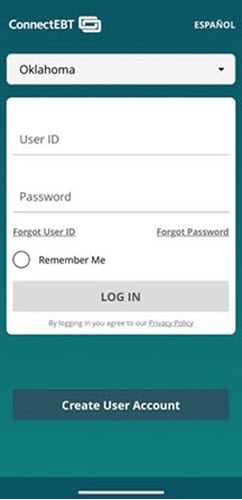
Log in for first time

Help

Problems Logging In

  • Forgot User ID
    • You can only register once.
    • User ID will be emailed if “forgot User ID”.
    • User ID will be sent to the email address you set up at registration.
  • Security Answer isn’t working
    • Answer must exactly match what you typed when selecting your most recent security question (including upper- and lower-case letters)
  • No access to email address
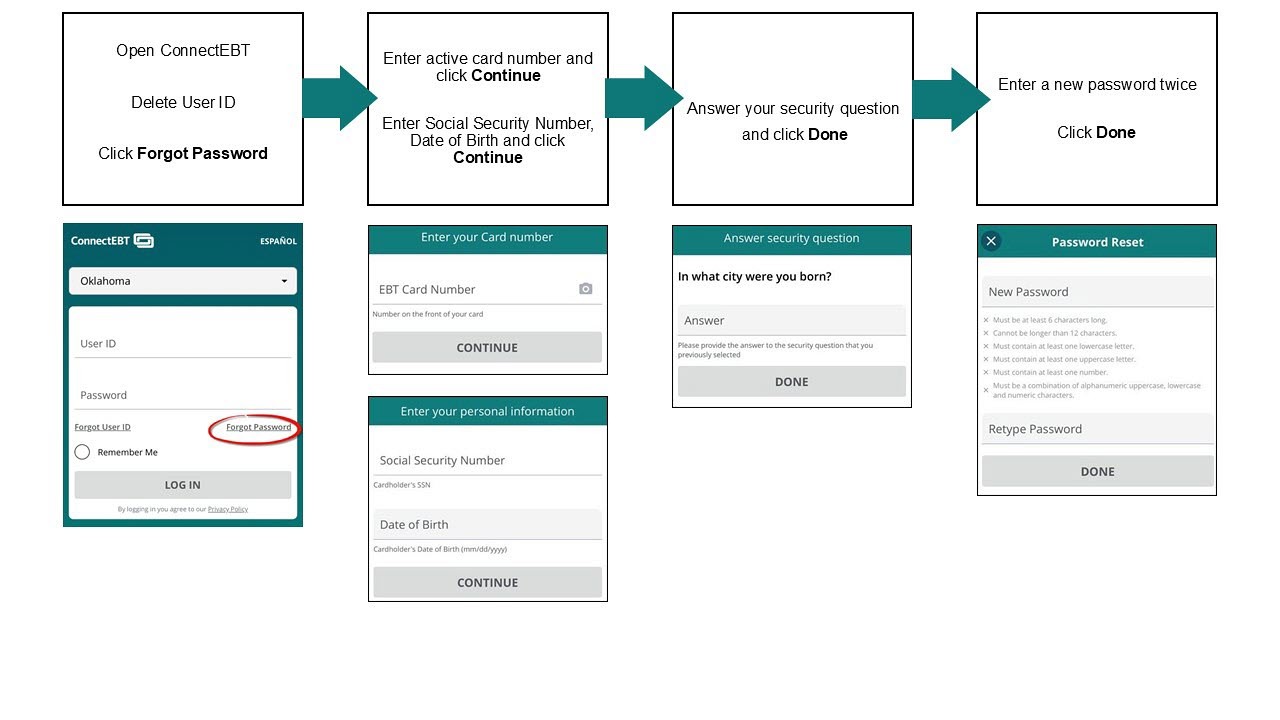
    • Email address is not needed for password reset.
    • A password reset requires card number, Social Security Number, and date of birth.
    • You can update your email address in ConnectEBT.
  • Locked out of App

  • Only shop on secure websites. Look for “https://” and a lock symbol in the address bar
  • Avoid public Wi-Fi for shopping unless you're using a trusted VPN.
  • Never save card details on websites or browsers you don’t fully trust.
  • Don’t provide your card information to any other apps.

Oklahoma EBT Card

Frequently Asked Questions (FAQ)

Improve your security

  • Security Question and Answer
    • The Security Question and Answer helps ensure only you are logging into your account
  • Personal Identification Number (PIN)
    • Your unique 4-digit code stops others from using your card
  •  Additional Security Password
    • An Additional Security Password adds a layer of protection when logging into your benefits account that you can create with the help of an OKDHS representative
  • Card Lock options
    • Lock Everywhere: Blocks all purchases. Must be unlocked for use
    •  Lock Out-of-State: Blocks only out-of-state transactions.
    • Automatically Re-lock: Card locks again after the set time limit
  • Change your PIN monthly, before benefits are loaded
  •  Report stolen benefits immediately and order a replacement card
    • Stolen SNAP benefits cannot be reimbursed. However, reporting stolen benefits can help reduce fraud: Report Stolen Benefits

  • Check locked status on ConnectEBT app home screen
  • You should receive an email notification when you lock and unlock your card.

Example email notification of lock/unlock:

From: noreply@services.conduent.com
Subject: Your EBT Card is Locked

1. Visit the ConnectEBT Web Portal or download ConnectEBT from the Apple Store or Google Play to register a new account

2. Login to your ConnectEBT account to activate your new card

3. Follow the prompts to verify your identity and choose a 4-digit PIN

  • Choose a PIN that is hard to guess and keep it secret
  • Invalid input error: PIN doesn’t follow rules. Try a new combination of numbers
    • Don’t use:
    • Repeating number (1123, 3446)
    • More than two numbers in order (1234, 5678)
    • Address
    • Phone number
    • Special dates (birthday, anniversary)
    • Last four digits of the card number
    • Previously used PIN

4.  Once activated, your card will be unlocked and ready to use

Click Update Email from Settings menu. Confirm your personal information and click Continue. Enter your new valid email address twice and click Done.

Access your benefits

Chip cards must be inserted. Mag Stripe cards will be swiped to pay.

  • If your card information is on the back, insert card into the chip reader at the register.
  • If your card information is still on the front, continue to swipe the magnetic stripe until you get your new chip card.

After you activate your new chip card, your old one deactivates right away.

If you don’t activate your new chip card, your old card will still deactivate in 90 days.

If the terminal does not accept chip, you will be prompted to swipe.

The chip function is the most secure way to use your card.

  • Make sure the chip is fully inserted and do not remove too early
  • Check your benefits balance
  • Make sure the card status is Active and it is not locked from purchases
  • If the terminal does not accept chip cards, you will need to swipe the magnetic stripe.

The State of Oklahoma is issuing new chip-enabled EBT cards to all SNAP households. These EBT Chip cards have enhanced security features to make transactions safer and more reliable.

Click Forgot User ID or Forgot Password from home screen to recover your account information.

Log in to your ConnectEBT account and your account balance is on home screen.

On ConnectEBT app, click transactions.

Use your new card

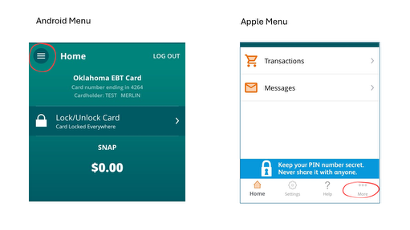
You can find your card status by going to the More menu on bottom of home screen (Apple users) or three lines (☰) on top (Android users). Click Report Lost/Stolen/Damaged Card

Card Status: Meaning

  • Active: Ready to use
  • Lost/Stolen/Damaged: Card permanently disabled. Order replacement.
  • Undeliverable: Card returned by mail. Update address with DHS.
  • Expired: Card is permanently disabled due to expiration date. Order replacement.
  • Issued: Card number has been created; physical card hasn’t been mailed yet.
  • Mailed: Card is in transit by mail.
  • Locked Everywhere: Card is locked from all transactions.
  • Locked Out-of-State: Card is locked from out-of-state purchases, allows online orders.
  • Hold for ID: Visit an Oklahoma Human Services office for more information
Last Modified on Sep 08, 2025
Back to Top